

Word add-in
Draft mode
Draft new clauses and research a point of law, then insert the text where you want it.
In Draft mode, the assistant does not edit your document. It writes drafts and answers research questions. You choose where each draft goes.
The assistant can read your open document. It can also search:
- LinkinLegal's laws and contract references, using the scope you chose for the chat.
- The Vault files you selected for the chat.
- The web, for current law and public guidance.
Draft a clause
-
Start a new chat and choose Draft.
-
Say what you need. For example:
Draft three versions of a confidentiality clause for a mutual NDA.
-
Wait for the draft cards. Each alternative or section gets its own card.
Insert a draft
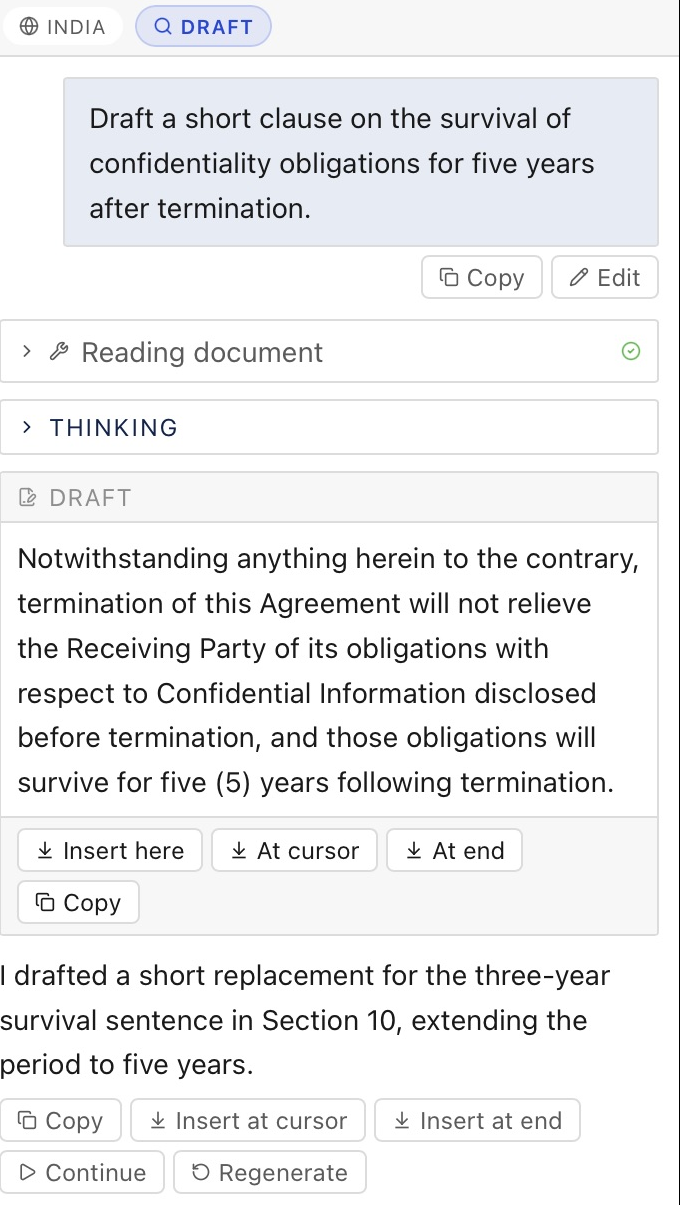
| Button | What it does |
|---|---|
| Insert here | Puts the draft where the assistant suggests. It shows only when there is a suggested place |
| At cursor | Puts the draft at your cursor |
| At end | Puts the draft at the end of the document |
| Copy | Copies the draft |
Headings, bold text and lists keep their Word formatting when you insert a draft.
Sources
Web sources appear as links in the assistant's chat reply. Drafts have no citations, so they paste cleanly into your contract.